

Dell PowerEdge Operate 2023 Practice Tests 2025 | Pass D-PE-OE-23 with confidence!
Practice DECA-PowerEdge D-PE-OE-23 exam. Online Exam Practice Tests with detailed explanations!
EMC D-PE-OE-23 Exam Syllabus Topics:
| Topic | Details |
|---|---|
| Topic 1 |
|
| Topic 2 |
|
| Topic 3 |
|
| Topic 4 |
|
| Topic 5 |
|
NEW QUESTION # 24
A technician is changing the iDRAC IP address from the static IP address 10.37.125.88 to DHCP on the technician's PowerEdge R640 that does not have a front LCD. After completing this task, they are unable to determine which IP address was given to the iDRAC and they cannot reboot the server.
What method could the technician use to determine what IP address is assigned to the iDRAC?
- A. Hold the system identification button down for more than 3 seconds to reset it back to the default static address 192.168.0.120
- B. Use the iDRAC Direct feature. Access iDRAC web GUI and determine the assigned IP address
- C. Plug a monitor or KVM into the system. Reboot the server to view the assigned IP iDRAC address on the Dell boot up splash screen
- D. Log in to the Lifecycle and check the iDRAC Settings.
Answer: B
NEW QUESTION # 25
iDRAC9 System Lockdown Mode is enabled.
In addition to the Power cap setting and System power operations, which settings can an administrator access?
- A. Part replacement
Diagnostics - B. Part replacement
Lifecycle Controller - C. Update firmware
Diagnostics - D. Update firmware
Lifecycle Controller
Answer: A
NEW QUESTION # 26
What type of fans are installed in servers with NVMe storage and GPU configurations?
- A. HPR
- B. STD
- C. VHP
- D. LFM
Answer: C
NEW QUESTION # 27
A server has 12x 32 GB RDIMMS installed with two CPUs. A technician has been called because the OS is seeing only 192 GB of memory instead of the full 384 GB. The server appears to be operating correctly and is displaying no errors on the LCD plus has no error entries in the logs relating to memory.
What should the technician do to resolve this issue?
- A. Replace CPU2
- B. Switch the Memory Mode to Optimized
- C. Update the memory controller firmware
- D. Switch the Memory Mode to Memory Mirroring
Answer: B
NEW QUESTION # 28
Which operation should a technician perform to ensure configuration recovery if a server must be physically replaced?
- A. Create and export a Server Configuration Profile
- B. Back up and export the Server Profile to a network share
- C. Back up the Server Profile to vFlash
- D. View and export the current hardware inventory
Answer: C
NEW QUESTION # 29
A technician completes initial system configuration of a server. They need to set up automated, proactive support without requiring a systems management console.
Which tool does the technician need to install?
- A. SupportAssist for iDRAC / Enterprise systems
- B. Support Assist Collector
- C. Open Manage Essentials
- D. Open Manage Server Administrator
Answer: A
NEW QUESTION # 30
A technician is creating a virtual disk in the DRAC (2x 4 TB NL-SAS in RAID 1) to install Windows
2016. They manually boot to the OS installation media without using the Lifecycle Controller OS Deployment wizard. Only the first 2048 GB on the virtual disk can be partitioned.
How should the technician obtain access to the remaining 2 TB (approximately) of storage?
- A. Use the lifecycle Controller's OS Deployment Wizard to deploy the OS on this server.
- B. Upgrade to a newer version of the operating system.
- C. Use F2 to go into the BIOS, change the BIOS boot mode to UEFI, and try again.
- D. Delete the 4 TB virtual disk and create a virtual (boot) disk no longer than 2048 GB.
Answer: C
NEW QUESTION # 31
A user has a drive failure on a server with four identical drives configured in a RAID 5 setup and no spare. The technician arrives and switches the bad drive with an identical new drive and completes a rebuild. A month later the user complains that the RAID configuration is a little slower than it was before the failure.
What action should the technician take?
- A. Replace the drive that was recently installed
- B. Power down the server, reseat the backplane cables on each drive then power on the server
- C. Check if the firmware on the newly replaced drive matches the existing drives in the RAID configuration
- D. Run a Patrol Read
Answer: C
NEW QUESTION # 32
What does OBPAR allow on a PowerEdge MX750c?
- A. Run a compute sled with maximum performance.
- B. Boot a compute sled with only one CPU.
- C. Run a compute sled with memory overclocking.
- D. Boot a compute sled with reduced frequency.
Answer: D
NEW QUESTION # 33
A new server has 128 GB of RAM and three 1 TB drives. After creating a RAID 5 array with the three internal drives on the system, a technician boots to the Lifecycle Controller to install Windows Server
2016. When the technician tries to select an install location, Windows displays an error message that states that it cannot be installed to that location.
What should the technician do to resolve this issue?
- A. Delete the array and use the Lifecycle Controller to configure the array
- B. Bring up the command prompt by pressing shift F10 and use the disk part to clean the disk
- C. Change the boot mode from BIOS to UEFI
- D. Verify that the license for installing an OS to a virtual disk is installed
Answer: C
NEW QUESTION # 34
A technician accesses the iDRAC to set up scheduled updates. This option is not available on one server, but is available on the other servers. The servers are the same model and have the same iDRAC firmware revisions.
What is required so that the technician can enable scheduled updates on the server?
- A. iDRAC reset using racadm racreset command
- B. Update option enabled in Lifecycle Controller interface
- C. iDRAC license at the Enterprise level
- D. LC Settings in Lifecycle Controller set up correctly
Answer: C
NEW QUESTION # 35
Eight new servers have arrived at a datacenter. All use static IP addresses for iDRAC. The technician needs to enable these servers to contact the DHCP server on the network to obtain new IP addresses.
What method can the technician use to quickly switch to DHCP?
- A. Reboot each server to enable DHCP default settings
- B. Boot into CTRL+S and change iDRAC settings to DHCP
- C. Log in to the iDRAC and enable DHCP
- D. Use the LCD panel to input a new IP address
Answer: C
NEW QUESTION # 36
What operating system supports the last crash tool in iDRAC?
- A. Unix
- B. MS Windows
- C. ESXi
- D. SUSE Linux
Answer: D
Explanation:
Understanding the Last Crash Tool in iDRAC
Server Troubleshooting (32%)
* Explain Configuration Validation, crash capture, and minimum to POST
What is the Last Crash Tool in iDRAC?
* Last Crash Screen: A feature in iDRAC that captures the last crash screen output from the operating system before a system crash or unexpected reboot.
* Purpose: Provides valuable information for diagnosing the cause of a system crash, aiding in troubleshooting efforts.
Operating System Support
* The Last Crash Screen feature is dependent on the operating system's ability to output crash information to the VGA console, which iDRAC can then capture.
Explanation of Options
* Option A: MS Windows
* Explanation: While Windows systems do produce crash screens (Blue Screen of Death), capturing this screen via iDRAC requires specific configurations and may not be fully supported.
* Conclusion: Less likely to be the correct answer.
* Option B: ESXi
* Explanation: VMware ESXi can produce Purple Screen of Death (PSOD), but capturing this via iDRAC's Last Crash Screen feature is not typically supported without additional configuration.
* Conclusion: Less likely to be the correct answer.
* Option C: SUSE Linux
* Explanation: SUSE Linux supports kernel crash dumps and can output crash information to the console, which iDRAC can capture using the Last Crash Screen feature.
* Conclusion:Correct Answer.
* Option D: Unix
* Explanation: "Unix" is a broad term encompassing various operating systems. Without specifying, it's unclear which Unix variant is being referred to, and support may vary.
* Conclusion: Less specific; not the best answer.
Dell Operate References
* Server Troubleshooting (32%)
* Explain Configuration Validation, crash capture, and minimum to POST: Emphasizes the importance of understanding features like the Last Crash Screen for troubleshooting.
* System Administration (18%)
* Verify health status and iDRAC license: Ensuring that the necessary features are enabled and supported on the operating system in use.
Conclusion
* SUSE Linuxsupports the Last Crash Screen tool in iDRAC, allowing for the capture and analysis of crash information directly from the server's console output.
NEW QUESTION # 37
Using the iDRAC UI, generate and save locally a SupportAssist collection with system information and debug logs only.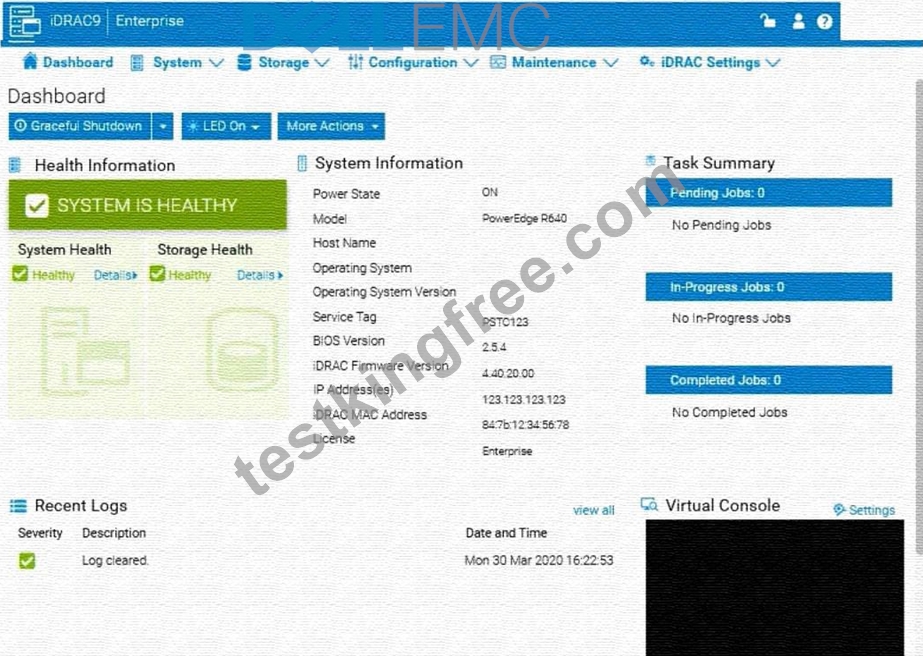
Answer:
Explanation:
See the Explanation for Step by Step solution.
Explanation:
To generate and save a SupportAssist collection with system information and debug logs only in the iDRAC UI, follow these steps:
Step-by-Step Guide:
* Access SupportAssist in iDRAC:
* In the iDRAC interface, navigate to the Maintenance tab in the top menu.
* From the dropdown, select SupportAssist. This will bring up the SupportAssist options.
* Initiate a Collection:
* In the SupportAssist section, look for the option to Create a New Collection or Start a Collection.
* Choose Collect System Data or Generate a Collection, depending on the version of iDRAC.
* Select Collection Components:
* When prompted to select components for the collection, check the boxes for System Information and Debug Logs only.
* Ensure no other components are selected to limit the collection to just the required data.
* Start the Collection:
* Confirm your selection, then click Start or Generate. This will initiate the process to gather the specified data from the system.
* Save the Collection Locally:
* Once the collection is complete, you should see an option to Download or Save the file.
* Click the download link and save the collection file locally on your computer.
* Verify the Collection File:
* Check the downloaded file to ensure it contains only the system information and debug logs. It should be in a format such as ZIP or TAR, depending on the system configuration.
By following these steps, you can successfully generate a SupportAssist collection with just the system information and debug logs and save it to your local system for further review or support purposes.
NEW QUESTION # 38
A drive has failed in one of the two disk groups in a Dell PowerEdge server. The assigned hot spare did not replace the failed drive.
How should the RAID SET have been assigned to avoid this issue?
- A. Revertible hot spare
- B. Global hot spare
- C. Persistent hot spare
- D. Dedicated hot spare
Answer: B
NEW QUESTION # 39
Which configuration settings are installed when using Easy Restore?
- A. BIOS, iDRAC, and NIC
- B. Virtual console, network, and SCP
- C. Asset tag, passwords, and RAID
- D. IDRAC, BOSS, and partitions
Answer: A
Explanation:
Understanding Easy Restore Functionality
Server Troubleshooting (32%)
* Explain Easy Restore, diagnostic utilities, and hardware diagnostic options What is Easy Restore?
* Easy Restoreis a feature in Dell PowerEdge servers that simplifies the process of restoring system configuration settings after replacing the system board (motherboard).
* Purpose:
* Reduces downtime by automatically restoring critical configuration settings.
* Eliminates the need to manually reconfigure settings after hardware replacement.
Configuration Settings Restored by Easy Restore
* BIOS Settings:
* Restores all BIOS configurations, including boot order, system settings, and performance options.
* iDRAC Settings:
* Restores Integrated Dell Remote Access Controller (iDRAC) configurations, such as network settings, user accounts, and management preferences.
* NIC (Network Interface Card) Settings:
* Restores network configurations for onboard NICs, including IP addresses, VLAN settings, and teaming configurations.
Explanation of Options
* Option A: "BIOS, iDRAC, and NIC"
* Analysis:
* Accurately reflects the settings restored by Easy Restore.
* BIOS: System configuration and hardware settings.
* iDRAC: Remote management settings.
* NIC: Network configurations.
* Conclusion:Correct Answer.
* Option B: "Virtual console, network, and SCP"
* Analysis:
* Virtual Console: Part of iDRAC features but not a configuration setting restored separately.
* SCP (Server Configuration Profile): Used for exporting/importing configurations but not directly restored by Easy Restore.
* Conclusion: Inaccurate.
* Option C: "iDRAC, BOSS, and partitions"
* Analysis:
* BOSS (Boot Optimized Storage Solution): A storage controller for boot drives; its settings are not restored by Easy Restore.
* Partitions: Disk partitions are not restored by Easy Restore.
* Conclusion: Incorrect.
* Option D: "Asset tag, passwords, and RAID"
* Analysis:
* Asset Tag: Restored by Easy Restore.
* Passwords: May or may not be restored, depending on security policies.
* RAID Configuration: Not restored by Easy Restore; requires separate backup and restoration procedures.
* Conclusion: Partially correct but not the best answer.
Dell Operate References
* Server Troubleshooting (32%)
* Explain Easy Restore, diagnostic utilities, and hardware diagnostic options: Understanding what configurations Easy Restore handles is essential for efficient troubleshooting and system recovery.
* Server Components (26%)
* Define the different processor, memory options, and memory configurations: Knowing how system configurations are managed and restored.
Conclusion
Easy Restore reinstalls configuration settings for theBIOS,iDRAC, andNIC. This feature ensures that critical system configurations are preserved after replacing the system board, minimizing downtime and administrative effort.
NEW QUESTION # 40
Due to recent security breaches and to avoid accidental changes made by the junior IT staff, an administrator would like to prevent unwanted configuration changes in the iDRAC UI.
Answer:
Explanation:
See the Explanation for Step by Step solution.
Explanation:
To prevent unwanted configuration changes in the iDRAC UI, you can adjust user roles, permissions, or enable specific security settings to restrict access for junior IT staff. Here are the steps to secure the iDRAC configuration:
Step-by-Step Guide:
* Access User Settings:
* In the iDRAC interface, navigate to iDRAC Settings from the main menu.
* Choose User Authentication or Users to manage user accounts and permissions.
* Adjust User Roles and Permissions:
* Identify the accounts associated with junior IT staff.
* For each user account, adjust the role to Read-Only if you want them to have view-only access without making configuration changes.
* Alternatively, set their permissions to exclude configuration changes. This may involve assigning a custom role with limited access based on your needs.
* Enable Configuration Lock (if available):
* Some versions of iDRAC offer a Configuration Lock feature, which prevents any configuration changes until the lock is removed by an administrator.
* Navigate to Configuration > System Security or User Authentication, depending on the version, and enable the Configuration Lock option.
* Set Up Two-Factor Authentication (Optional):
* For added security, enable Two-Factor Authentication under iDRAC Settings > Network or Security settings. This step ensures only authorized users can access and make changes to the iDRAC UI.
* Save and Apply Security Changes:
* After setting up the desired restrictions and permissions, save the settings to apply the changes.
* Verify that junior IT staff accounts now have restricted access and cannot make configuration changes.
* Log Out and Test the Changes:
* Log out of the administrator account and log in with a junior IT staff account to confirm that the permissions are set correctly.
* Ensure that configuration changes are disabled and that the user can only view the iDRAC interface as per the restrictions.
By following these steps, you can restrict junior IT staff from making any configuration changes within the iDRAC interface, thus preventing accidental or unauthorized modifications.
NEW QUESTION # 41
Which component of the Dell EMC PowerEdge server provides system information, status, and error messages to indicate when the system is operating correctly, or when the system needs attention?
- A. Front Panel LCD
- B. BIOS
- C. UEFI
- D. RACADM
Answer: A
NEW QUESTION # 42
......
Get instant access to D-PE-OE-23 practice exam questions: https://drive.google.com/open?id=1hbOCNdwndsmIP4SXx02oBf3Tv2DsP1op
The best D-PE-OE-23 exam study material and preparation tool is here: https://www.testkingfree.com/EMC/D-PE-OE-23-practice-exam-dumps.html