

CompTIA 220-1101 Real Exam Questions and Answers FREE
Exam Dumps 220-1101 Practice Free Latest CompTIA Practice Tests
NEW QUESTION # 416
A user is unable to access the internet on a PC. A technician examines the PC and runs the following commands:
Which of the following steps in the troubleshooting process does this series of commands represent?
- A. Identify the problem.
- B. Verify full system functionality.
- C. Establish a theory.
- D. Establish a plan of action.
Answer: B
NEW QUESTION # 417
A technician needs to adjust the VLAN to allow users in the sales department to access the marketing department's network resources. Which of the following should the technician configure?
- A. Hub
- B. Server
- C. Patch panel
- D. Network card
- E. Switch
Answer: E
Explanation:
To adjust the VLAN configuration, the technician needs to configure the switch. VLANs are configured on switches to segment network traffic logically, even if the devices are connected to the same physical network. By adjusting the VLAN settings on the switch, the technician can ensure that the sales department has access to the marketing department's network resources.
NEW QUESTION # 418
An engineer is building a workstation that requires the following components:
*An ATX motherboard
*A multi-core processor
*A dedicated graphics solution
*A SATA hard drive
*DDR4 memory
Which of the following power supply specifications would meet the workstation criteria?
- A. 12V. 500W output
- B. Type A socket
- C. DC input
- D. SFX, 18-pin connector
Answer: A
Explanation:
The appropriate power supply specification for the described workstation setup is 12V, 500W output. This specification ensures that the power supply can handle the combined power requirements of an ATX motherboard, multi-core processor, dedicated graphics solution, SATA hard drive, and DDR4 memory. The
12V rail is crucial for components such as the CPU and graphics card, while a 500W output provides sufficient power overhead to support the system under load, as well as potential future upgrades or additional components.
References:
* CompTIA A+ Core 1 (220-1101) Exam Objectives, Section 3.0 Hardware, specifically the subsection on power supplies and their specifications, including voltage outputs and wattage requirements for various computer components.
* General knowledge on the power requirements of ATX motherboards, multi-core processors, dedicated graphics cards, SATA hard drives, and DDR4 memory, ensuring compatibility and efficient operation.
NEW QUESTION # 419
A customer reports that a text-only document prints with unrecognizable characters. The print preview correctly displays the document. Which of the following is the most likely cause of the issue?
- A. Outdated firmware
- B. Incorrect driver
- C. Corrupted document file
- D. Bad toner cartridge
Answer: B
NEW QUESTION # 420
A user prints a spreadsheet in duplex mode. The spreadsheet is difficult to read because some of the columns spill onto the second side of the page. Which of the following should the user do to prevent the issue but still print on both sides of the page?
- A. Change the page orientation.
- B. Use a different print driver.
- C. Turn off duplex printing.
- D. Try a smaller font size in the spreadsheet.
Answer: A
Explanation:
Changing the page orientation (e.g., from portrait to landscape) allows wider columns to fit on one side of the page. This maintains readability while continuing to use duplex printing.
* Option A: Disabling duplex defeats the goal of printing on both sides.
* Option B: May help, but could make the document harder to read if the font is too small.
* Option D: Unlikely to resolve formatting issues related to layout and dimensions.
CompTIA A+ Core 1 Exam Objective Reference:
* Objective 3.7: Given a scenario, troubleshoot common printer problems.
NEW QUESTION # 421
A technician wants to stress test multiple applications while maintaining the ability to easily reset those environments back to the initial state. Which of the following is the best way to accomplish this task?
- A. Sandbox
- B. Honeypot
- C. Hybrid cloud
- D. Production network
Answer: A
Explanation:
A sandbox is a virtual environment that allows testing or running applications without affecting the main system. A sandbox can isolate the applications from the rest of the system, preventing any unwanted changes, errors, or security risks. A sandbox can also be easily reset to the initial state, discarding any modifications or data generated by the applications12.
A sandbox is a useful tool for stress testing multiple applications, as it can:
*Simulate different scenarios and conditions for the applications, such as high load, low memory, network latency, etc.
*Monitor and measure the performance, stability, and resource consumption of the applications under stress.
*Compare and analyze the results of different applications or different versions of the same application.
*Identify and fix any bugs, errors, or vulnerabilities in the applications before deploying them to the main system.
NEW QUESTION # 422
A technician identified an issue on a workstation, obtained details from the user, and made a backup of the system. Which of the following should the technician do NEXT?
- A. Establish a theory of probable cause, researching internally or externally as needed.
- B. Design a plan of action to resolve the issue and implement the solution.
- C. Determine the next steps to resolve the issue and document it.
- D. Document the findings, actions, and outcomes.
Answer: A
Explanation:
Explanation
After the issue has been identified and the backup of the system has been made, the next step is to establish a theory of probable cause. This involves researching the issue to determine the root cause of the problem. This can involve researching internally (e.g. referring to the system logs) or externally (e.g. searching online). Once the probable cause has been identified, the technician can then move on to the next step of designing a plan of action to resolve the issue and implementing the solution.
NEW QUESTION # 423
Which of the following describes the main difference between T568A and T568B cabling standards?
- A. T568A is used in blue cables, and T568B is used in green cables.
- B. The green and the orange cables are interchanged.
- C. The T568B data transfer rate is higher than T568A.
- D. The standards use different cable connectors.
Answer: B
Explanation:
Explanation
he main difference between T568A and T568B cabling standards is that the green and orange cables are interchanged12. T568A is designed for backward compatibility with older telephone wires, while T568B is designed for better signal isolation and noise protection for newer networking systems and products3. T568A is used in blue cables, and T568B is used in green cables1. The standards use the same cable connectors3.
NEW QUESTION # 424
A user reports that a printer pulls multiple sheets of paper from the paper tray instead of a single sheet. Which of the following should a technician investigate to resolve this issue? (Select two).
- A. Separation pad
- B. Duplexer
- C. Tractor feed
- D. Fuser
- E. Pickup roller
- F. Toner cartridge
Answer: A,E
Explanation:
The correct answers are C. Pickup roller and D. Separation pad.
A pickup roller is a rubber wheel that grabs the paper from the paper tray and feeds it into the printer. A separation pad is a small piece of cork or rubber that prevents more than one sheet of paper from being fed at a time. If the pickup roller or the separation pad is worn out, dirty, or damaged, it can cause the printer to pull multiple sheets of paper instead of a single sheet. This can lead to paper jams, misprints, or wasted paper.
To resolve this issue, a technician should investigate the condition of the pickup roller and the separation pad and replace them if necessary. The technician should also clean the paper tray and make sure the paper is loaded correctly and not stuck together.
A toner cartridge is a component that contains the toner powder used to create the printout on a laser printer.
A tractor feed is a mechanism that uses sprockets to move continuous paper through a dot matrix printer. A duplexer is a device that allows a printer to print on both sides of the paper automatically. A fuser is a part of a laser printer that melts the toner onto the paper using heat and pressure. None of these components are related to the issue of pulling multiple sheets of paper from the paper tray.
Reference: Types of Printers-What You Need to Know for the CompTIA A+ Exams
NEW QUESTION # 425
An end user discovered that the touch-screen features on a Windows device have stopped working. Which of the following should a technician check?
- A. Display settings
- B. System configuration
- C. Tablet/PC settings
- D. Performance monitor
Answer: C
Explanation:
If the touch-screen features on a Windows device have stopped working, a technician should check the Tablet/PC settings. The Tablet/PC settings contain options for configuring the touch-screen features on a Windows device. By checking the Tablet/PC settings, the technician can ensure that the touch-screen features are enabled and configured correctly.
If the touch-screen features on a Windows device have stopped working, a technician should check the Tablet/PC settings. The touch-screen settings may have been disabled or there may be a driver issue that needs to be resolved. References: CompTIA A+ Certification Exam Guide, pg. 536
NEW QUESTION # 426
A laptop's external webcam software is running, but it shows no image or video. Which of the following should a technician perform FIRST?
- A. Reinstall the webcam software and drivers.
- B. Research new webcam firmware.
- C. Restart the computer and run system diagnostics.
- D. Reseat the webcam.
Answer: D
NEW QUESTION # 427
A user's laptop keyboard is not working properly. A technician notices that when the keys for special characters are pressed, other characters appear instead. Which of the following should the technician do first to diagnose the issue?
- A. Check the keyboard layout.
- B. Update the keyboard drivers.
- C. Replace the keyboard.
- D. Change the keyboard language.
Answer: A
Explanation:
The first thing that the technician should do to diagnose the issue is
A) Check the keyboard layout.
The keyboard layout is the arrangement of the keys and symbols on the keyboard, which can vary depending on the language, region, or standard. If the keyboard layout is not set correctly, it can cause the keys to produce different characters than expected. For example, if the keyboard layout is set to French, pressing the key for @ will produce a instead.
To check and change the keyboard layout, the technician can follow these steps:
* On Windows 10, click on the Start menu and select Settings.
* Click on Time & Language and then on Language.
* Under Preferred languages, click on the current language and then on Options.
* Under Keyboards, check if the keyboard layout matches the physical keyboard. If not, click on Add a keyboard and select the correct layout. Alternatively, click on Remove to delete any unwanted layouts.
* To switch between keyboard layouts, use the shortcut Windows key + Space bar.
Checking the keyboard layout can help identify and fix the issue quickly and easily, without requiring any hardware or software changes. Therefore, it is the best first step to diagnose the issue.
Reference:
1: How to change your keyboard layout on Windows 10 PC | Windows Central
2: How to type French accents on a PC - FrenchCrazy
NEW QUESTION # 428
Which of the following cloud models would multiple organizations in the same industry most likely use?
- A. Hybrid
- B. Community
- C. Private
- D. Public
Answer: B
Explanation:
A Community Cloud is designed for use by several organizations with shared concerns (e.g., security, compliance, jurisdiction). It's common in industries like healthcare or finance where multiple entities benefit from a common infrastructure with shared policies.
* Option A (Public): Open to general public or large industry group - less secure.
* Option B (Hybrid): Mix of public and private - does not imply industry collaboration.
* Option D (Private): Dedicated to a single organization.
CompTIA A+ Core 1 Exam Objective Reference:
* Objective 2.1: Compare and contrast cloud computing concepts.
NEW QUESTION # 429
A user needs a portable, low-cost storage solution that is small enough to carry in a pocket and has the largest capacity possible. Which of the following is the best solution for the user?
- A. Flash drive
- B. M.2
- C. DVD-R
- D. Memory card
Answer: A
NEW QUESTION # 430
A user reports a monitor, keyboard, mouse. and headset are no longer functioning. The user has restarted the laptop and tested an alternative headset and monitor, but the issue persists. The technician notices the user has a printer. USB-C hub, and AC adapter plugged into the laptop. Which of the following should the technician do to MOST likely resolve the issue?
- A. Replace the user's USB-C hub.
- B. Make sure the printer is not drawing too much power.
- C. Reinstall the drivers for affected devices.
- D. Repair the operating system.
- E. Verify the AC adaptor voltage.
Answer: A
Explanation:
The most likely cause of the issue is that the user's USB-C hub is faulty or incompatible with the laptop. The USB-C hub is a device that allows the user to connect multiple peripherals to the laptop using a single USB-C port. If the hub is not working properly, it may prevent the monitor, keyboard, mouse, and headset from functioning. The technician should replace the user's USB-C hub with a new one that is compatible with the laptop and test the peripherals again. Verifying the AC adapter voltage will not help with the issue, as the AC adapter is used to power the laptop, not the peripherals. Repairing the operating system will not help either, as the issue is not related to software. Reinstalling the drivers for affected devices may not help, as the issue may be caused by the hub, not the devices. Making sure the printer is not drawing too much power is irrelevant, as the printer is not connected to the hub or affecting the other peripherals. References:
https://www.comptia.org/blog/what-is-usb-c
NEW QUESTION # 431
A user attempted to install an application on a desktop, and the installation attempt failed. A technician compares these installation files to those on another user's machine and finds the files are different. Which of the following should the technician do NEXT?
- A. Complete the final report.
- B. Test the functionality of the antivirus.
- C. Determine the source of the installation file.
- D. Verify the system functionality.
- E. Attempt to reinstall the application.
Answer: E
NEW QUESTION # 432
A technician is installing the RAM for a graphs workstation. Which of the following is special purpose memory used by graphic controllers?
- A. MicroDlMM
- B. Unbuffered DIMM
- C. SRAM
- D. VRAM
Answer: D
Explanation:
VRAM (Video Random Access Memory) is a special-purpose memory type used by graphics controllers to store image data that is displayed on the screen. VRAM is faster and more expensive than regular RAM, and it allows the graphics controller to access the image data directly without involving the CPU or the system memory. VRAM can improve the performance and quality of graphics-intensive applications, such as video editing, gaming, and 3D rendering.
References:
*Ram Flashcards | Quizlet, question "Which of the following is a special-purpose memory type used by graphics controllers?".
*Nvidia Unveils Big Accelerator Memory: Solid-State Storage for GPUs, paragraph 4.
*US5801706A - Special purpose memory for graphics and display apparatus ..., abstract.
NEW QUESTION # 433
A help desk technician thinks a desktop PC has failed due to a defective power supply Which of the following steps should the technician take next?
- A. Conduct external or internal research based on symptoms.
- B. Document the findings, actions, and outcomes.
- C. Inquire about environmental or infrastructure changes.
- D. Establish a plan of action to resolve the problem and implement the solution.
Answer: A
Explanation:
According to the CompTIA troubleshooting methodology, the next step after establishing a theory of probable cause is to test the theory to determine the cause. However, before testing the theory, the technician may need to conduct some research based on the symptoms and the possible cause. This may involve consulting online resources, manuals, documentation, or colleagues to find out more information about the power supply and how to test it. Research can help the technician confirm or eliminate the theory and avoid unnecessary actions or damage.
Answer A is incorrect because inquiring about environmental or infrastructure changes is part of identifying the problem, which is the first step of the troubleshooting methodology. The technician should have already done this before establishing a theory of probable cause.
Answer C is incorrect because establishing a plan of action to resolve the problem and implement the solution is the fourth step of the troubleshooting methodology. The technician should not jump to this step without testing the theory and verifying the cause.
Answer D is incorrect because documenting the findings, actions, and outcomes is the last step of the troubleshooting methodology. The technician should not do this until the problem is resolved and verified.
Reference: Troubleshooting Methodology | IT Support and Help Desk | CompTIA The technician thinks the power supply is defective, indicating an initial hypothesis but not a confirmed diagnosis. According to the CompTIA A+ Core 1 Study Guide, troubleshooting follows a structured methodology (Objective 5.5: "Given a scenario, troubleshoot problems related to motherboards, RAM, CPU, and power"). At this stage, the technician has likely identified the problem (PC failure) and gathered basic information (suspected power supply issue). The next step is to refine the theory by conducting research based on symptoms-such as checking for common power supply failure signs (e.g., no power, burning smell, or intermittent shutdowns)-before proceeding to action or documentation.
B: Conduct external or internal research based on symptoms: This involves verifying the hypothesis by reviewing symptoms against known power supply failure patterns, possibly consulting manuals, online resources, or past experiences. It ensures the technician's suspicion is grounded in evidence before proceeding.
A: Inquire about environmental or infrastructure changes: This is part of initial information gathering, typically done before forming a hypothesis, not after suspecting a specific component.
C: Establish a plan of action and implement the solution: Premature without confirming the power supply is the issue; action comes after testing the theory.
D: Document findings, actions, and outcomes: Documentation occurs after resolving the issue, not at this intermediate stage.
The study guide's troubleshooting steps prioritize research and theory validation after identifying a potential cause, making B the next logical step.
Exact Extracts from the Study Guide:From The Official CompTIA A+ Core 1 Study Guide (220-1101):
Section 5.5, Troubleshooting Methodology:
"1. Identify the problem... Gather information from the user, identify user changes, and perform backups if applicable."
"2. Establish a theory of probable cause (question the obvious)... Conduct external or internal research based on symptoms to refine your theory."
"3. Test the theory to determine cause... Once confirmed, move to planning and action."
"4. Establish a plan of action to resolve the problem and implement the solution."
"5. Verify full system functionality..."
"6. Document findings, actions, and outcomes."
Implication: After suspecting a power supply failure (step 1), the technician moves to step 2-researching symptoms-before testing or acting.
Section 5.5, Power Supply Issues:
"Power supply failure symptoms-No power, system won't boot, intermittent shutdowns, or a burning smell... Research common indicators online or in documentation to confirm the issue before replacing components." These excerpts show that researching symptoms follows the initial hypothesis and precedes actionable steps, aligning with option B.
Additional Reasoning:Current Stage: The technician has a theory ("defective power supply") but hasn't confirmed it. Research bridges the gap between suspicion and certainty.
Power Supply Symptoms: Symptoms like no power or random reboots need validation-e.g., checking if fans spin or if there's a capacitor failure-which research can guide.
CompTIA Methodology: The six-step process is sequential. Step 1 (identify problem) is done; step 2 (establish and research theory) is next, not jumping to action (step 4) or documentation (step 6).
Other Options:
A: Asking about changes (e.g., power surges) is part of step 1, likely already done to suspect the power supply.
C: Planning and implementing (e.g., replacing the PSU) requires a tested theory, not just a suspicion.
D: Documentation is the final step, not the next one after forming a hypothesis.
References:The Official CompTIA A+ Core 1 Study Guide (220-1101):
Section 5.5: "Given a scenario, troubleshoot problems related to motherboards, RAM, CPU, and power" (troubleshooting methodology and power supply issues).
CompTIA A+ Core 1 (220-1101) Exam Objectives:
Objective 5.5: Apply the troubleshooting process, including researching symptoms to confirm theories.
NEW QUESTION # 434
A user called the help desk to request assistance with selecting appropriate storage to back up a large collection of DVDs and photos in the most economical way. Which of the following should the help desk recommend?
- A. Optical media
- B. M.2 NVMe SSD
- C. SAS RAID array
- D. 5,400rpm HDD
Answer: A
Explanation:
Optical media, such as CDs, DVDs, or Blu-ray discs, are a suitable choice for backing up a large collection of DVDs and photos in the most economical way. Optical media are inexpensive, widely available, and have a long shelf life. They can store large amounts of data, up to 50GB on a dual-layer Blu-ray disc, and can be easily labeled and organized. Optical media are also less prone to mechanical failure, data corruption, or accidental deletion than hard disk drives (HDDs) or solid state drives (SSDs).
NEW QUESTION # 435
A user creates a support ticket to report a conference room projector that does not work. The user says that even though the provided cables are being used, the projector screen shows the following error message:
No signal input
Which of the following describes the FIRST action that should be taken?
- A. Check the video cable and replace it if necessary.
- B. Replace the projector bulb.
- C. Verify that the projector is turned on.
- D. Verify that the user is using an approved OS.
Answer: A
Explanation:
The most common reasons you may be seeing the "No Signal" message: The projector and the source device are not connected correctly.
NEW QUESTION # 436
An administrator is configuring a corporate-owned smartphone for a new manager. The company requires the ability to wipe the phone's data remotely in the event of loss or theft and the capability to approve applications installed on the phone. Which of the following tools would BEST meet this need?
- A. WPA2-Enterpise wireless
- B. Corporate enterprise email
- C. Mobile device management
- D. Tethering to a corporate-owned laptop
Answer: C
Explanation:
Mobile Device Management (MDM) is a software solution that allows companies to manage and secure mobile devices used in the corporate environment. MDM provides features such as remote data wipe, application management, and device security policies to ensure data protection and compliance with company policies. References: CompTIA A+ Certification Exam Objectives 220-1001 - Mobile device hardware and operating systems - 2.8
NEW QUESTION # 437
A company wants to use client-side visualization for application testing. Which of the following configurations would BEST support this goal?
- A.
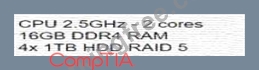
- B.
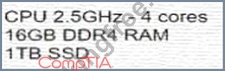
- C.
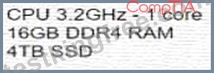
- D.
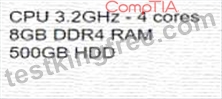
Answer: B
NEW QUESTION # 438
Which of the following cables provides the best performance with the least EMI?
- A. Coaxial
- B. Cat 6
- C. Cat 5
- D. Cat 7
Answer: D
Explanation:
Category 7 (Cat 7) cables provide the best performance with the least Electromagnetic Interference (EMI) due to their enhanced shielding. Cat 7 cables are designed to support higher speeds and bandwidth while reducing interference compared to Cat 5 or Cat 6.
* Why Not A (Cat 5): Cat 5 cables have limited shielding and are prone to EMI, making them unsuitable for high-performance requirements.
* Why Not B (Cat 6): Cat 6 offers better shielding than Cat 5 but less than Cat 7.
* Why Not D (Coaxial): While coaxial cables are resistant to EMI, Cat 7 offers better performance overall for networking applications.
CompTIA A+ Exam Reference: Core 1 (220-1101), Section 3.1, cable types and their performance characteristics.
NEW QUESTION # 439
An integrated webcam on a user's laptop broke, so a technician installed a temporary, external webcam. Since the external webcam installation, other users can only see part of the user's face during videoconferences. Which of the following BEST describes the reason for this issue?
- A. The webcam is not on a level surface.
- B. The webcam driver should be updated.
- C. The webcam is not compatible with the OS.
- D. The webcam is plugged into the wrong USB port.
Answer: A
Explanation:
The most likely reason for the issue is that the webcam is not on a level surface, which causes the camera angle to be distorted. The user should adjust the position of the webcam so that it is aligned with the laptop screen and captures the user's face fully. The other options are not relevant to this issue, as they would not affect the camera angle or visibility of the user's face.
NEW QUESTION # 440
......
Verified 220-1101 Exam Dumps Q&As - Provide 220-1101 with Correct Answers: https://www.testkingfree.com/CompTIA/220-1101-practice-exam-dumps.html
220-1101 Exam Questions | Real 220-1101 Practice Dumps: https://drive.google.com/open?id=1elq6G2d8rPE5azf6aVocd1mHFCuVoOhR